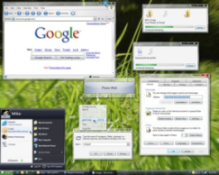
Windows Vista is Microsoft's most recent addition
to its line of operating systems. Because Windows operating systems
are known for their security holes, the new system was originally
planned as a complete re-write of the entire operating system. After
five years of development, Microsoft ultimately scaled back the
project in order to finish in 2006 as planned, but it did not release
Vista for sale until the end of January 2007. The features in this
recent release are:
- Windows Aero (the new interface of the higher-end versions)
- Speech recognition
- Integrated search
- Security improvements
- Sidebar and Gadgets
- ReadyBoost
- SideShow
- A bundled application like Photo Gallery, Media Center, Movie Maker, or Meeting Space
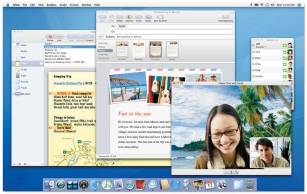
If this list sounds curiously
like Mac OS
X,
the New
York Times' David Pogue would disagree.
Windows Vista comes in six editions which differ in interface, features, and (of course) pricing. The editions are as follows:
- Home Basic
- Home Basic N
- Home Premium
- Business
- Business N
- Starter
- Enterprise
- Ultimate
Of these the edition closest to Windows XP is Vista Home Basic. It
does not offer the new windowing system, Aero, like the other
editions. Therefore, it has hardware requirements that are less
demanding and that are closer to those of Windows XP. It
also looks
similar to XP. As
with Windows
XP, Microsoft now supplies versions of Windows that are not
bundled with Windows Media Player. This is because the company has
been found guilty of anti-competative tactics and monopolistic
behavior. In the Vista versions, Home Basic N is the home version
without the media player. It is only sold within the European
Union.
Home Premium is the newest incarnation of Windows Media Center. It is
also intended for mobile computing.
Business is intended for small business owners. While the PR verbage
talks a lot about being perfect for the business, the only application
or feature mentioned in the advertisements is better connectivity with
Microsoft's office suite -- useful only if the user spends several
hundred more dollars for the new edition of Microsoft Office. Again,
because Microsoft violated anti-trust laws and competed illegally, it
now offers Business N, the Business version without the Windows Media
Player.
Like XP
Starter Edition, Vista Starter is for so-called emerging
markets. It is not widely available. Similarly, Windows
VistaEnterprise offersfeatures oriented toward large business and is
only available for bulk purchases. Windows Vista Ultimate combines
the features of Home Premium and Business.
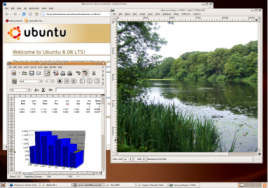
Being similar to Windows Vista but still very different,
Ubuntu is available in the following editions:
- Ubuntu
- Edubuntu
- Kubuntu
- Xubuntu
Unlike Vista, Ubuntu does not differentiate between its home and
business editions. The version homemakers use for things like recipe
collection or children use for games is the same version used by
programmers in large businesses like Google. The focus of business or
enterprise editions - security and stability - is equally available to
the home user.
Have you signed up for Ubuntu Helps yet?
Stay current with Ubuntu by subscribing to the Easy Ubuntu Linux
newsletter, Ubuntu Helps
Many people are impressed by the three-dimensional desktop support of
Vista. Ubuntu has had this available since early 2006 by manual
installation. Starting with version 7.04 in April 2007, it has
three-dimensional support included by default. In fact, several parts
of Vista's feature set was already implemented in Ubuntu a full year
before Microsoft released it: three-dimensional window interface,
integrated desktop searching, sidebar, applets (Microsoft calls them
gadgets; Apple calls them widgets), creation of virtual memory
on-the-fly (i.e., ReadyBoost), as well as excellent multimedia
supportfor photo galleries, movie making, meeting space software, and
playing and burning both CDs and DVDs. Consequently, one can say that
Ubuntu 6.04 is comparable to many Vista features and includes many of
its own features like superior security, stability, configurability,
extensibility, and networking capabilities.
Unlike Windows, Ubuntu offers more than an internet-based updating
notification service. With a click of approval, Ubuntu will also
download, install and configure those updates, all the while ensuring
that your system is not harmed in the process.
Beyond Ubuntu, there are a few specialist packages. Edubuntu is
specifically oriented toward schools and teaching. It includes
educational games for children as young as three. But it also
includes key applications for students in higher levels, including
high school or college. At its core, however, it remains the same as
regular Ubuntu.
In addition to these, two other editions of Ubuntu are available for
different graphic interfaces and pre-packaged programs. Kubuntu is
oriented to those who prefer to use the KDE graphic interface instead
of Ubuntu's default, GNOME. Xubuntu is for those who prefer the xfce
graphic interface.
Unlike Windows, Ubuntu does not need to be trimmed down to be embedded
or to work on a tablet PC. It is already small enough and fast enough
for that. Also, Linux is already embedded in PDAs and cell phones
without major revisions.
Also unlike Windows Vista, Ubuntu - and Linux in general - is very
robust. It can run on relatively old computers. Therefore, there is
no need for a legacy edition. But it can also run on full media
centers without needing a new version of the operating system.
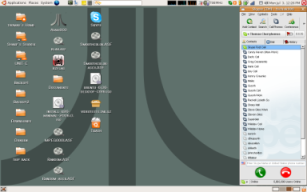
For the purposes of the general computer user, Windows Vista offers
relatively few applications. Perhaps the two most significant
features for most users was the new interface and the multimedia
utilities. More advanced users might benefit from ReadyBoost and
other special-purpose utilities. Anything beyond the basic
functionality requires the purchase of additional software. With that
comes software compatability issues.
Ubuntu, on the other hand, comes with high quality,
industrial-strength applications on the installation CD. These
include a full office suite, a graphics package that has around 80% of
the functionality of Adobe Photoshop, a full personal information
manager that functions similarly to Outlook, instant messaging, and
Skype-like Internet phoning. Using Ubuntu's built-in installation
utility, one can select applications which the program will then find
on the Internet, download, install, and configure at the click of a
button.
One of the great frustrations endured for some time by
Linux users and Windows users alike was incompatability issues between
the software and the operating system. Ubuntu gets around this by
checking the dependencies of a program before it is installed. If a
required package is not installed and needs to be, Ubuntu will offer
to find it and install it first, and then continue installing the
previously selected program.
Ubuntu will run on just about any PC with greater than 180 Mb of
RAM.For those computers with less than 180 Mb of RAM, Xubuntu is
recommended.
According to Microsoft, one must purchase a Vista Capable
or Vista Premium Ready computer to run any edition beyond
Windows VistaBasic. A Vista Capable machine has the following
hardware at a minimum: 800 MHz processor, 512 Mb physical RAM, and a
DirectX 9graphics card. A Vista Premium Ready computer has
much more: a 1 GHz processor or better, 1 Gb physical RAM, and an
Aero-compatiblevideo card that has at least 128 Mb of video RAM.
These bare essential requirements are listed
on Microsoft's
website.
While Ubuntu offers significantly more functionality immediately upon
installation than Windows Vista does, the starkest point of comparison
is price. As I write this, the entry-level Windows Vista Home retails
for $198.78 (USD) at Wal-Mart. The Premium edition sells for
$238.78(USD). Ultimate costs $398.99. Even an upgrade to Windows
Vista Ultimate costs $258.88. Ubuntu, on the other hand, remains free
of charge. You can download it or even request a free installation
CD, sent to you wherever you live for free (no charge for the postage,
even!).
Return to "Ubuntu, Comparatively Speaking"








