What is Linux?
Linux is an operating system for your computer. Like the Mac and Windows systems, it provides the basic computer services needed for someone to do things with a computer. It is the middle layer between the computer hardware and the software applications you run.
Full applications have capabilities like boldface type and picture editing tools. None of this is available through the operating system. Yet all of it is done by communicating with the machinery of the computer through the operating system. You may highlight a word in your wordprocessor and tell it that you want that word in bold type, but the operating system tells the computer which pixels (or part of the screen) to darken.
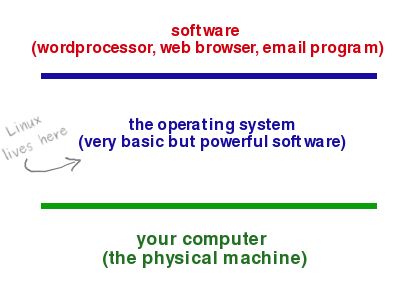
A (Very) Brief History of Linux
Linux was developed by Linus Torvalds and a band of programmers who voluntarily developed the core program of the system (aka, the kernel). That program was originally compatible for another operating system called Minix, but later development made it usable with GNU software.
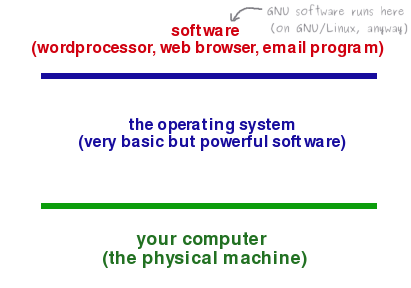
Enter GNU
GNU is pronounced like the animal and stands for 'GNU's Not Unix.' It was a project conceived by Richard Stallman in 1983 in response to the increasing tendency of software companies to copyright their software under terms that prohibited sharing. GNU's purpose: to develop a wholly free system. It had achieved significant progress toward this goal by the time that Linus and others had developed their kernel in the 1990s.
While many people refer to the combination of the two as "Linux", this is not wholly correct. The kernel combined with GNU's free software is properly called "GNU/Linux."
Both the kernel and the software are freely available under licencing that is sometimes called "copyleft" (as opposed to copyright). Where traditional copyright was meant to restrict usage and ownership of a copyrighted item to as few people as possible, inhibiting development and growth, GNU/Linux is different. It is released under terms designed to ensure that as many people as possible are allowed to receive, use, share, and modify the software. That licence is called the GPL (GNU Public Licence).
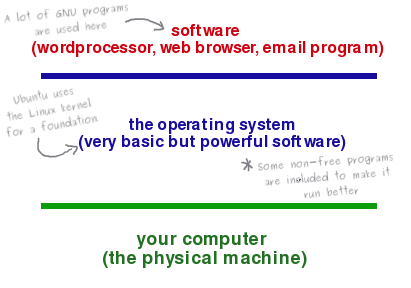
Linux + GNU + Some Other Special Software = Ubuntu
Ubuntu depends on the Linux kernel and includes many GNU applications. So, when someone speaks of the Ubuntu kernel for a computer, they are actually talking about a recent version of the Linux kernel. Most of the applications that are available for Ubuntu are either part of the GNU collection or are released under the GPL.
Find out more about Ubuntu and Linux:
- A Brief History of Linux
- The Linux kernel is the basic programming foundation for the entire Ubuntu operating system. Here is how it started and why it is called GNU/Linux.
- Ubuntu's African Roots
- Ubuntu comes from an African word that suggests humanity and community.
- Ubuntu, Comparatively Speaking
- Ubuntu compares well against any operating system in use today, including Windows, Mac, and other Linux versions.
- Get Ubuntu Linux: Download, Request, or Order Ubuntu
- Ubuntu can be downloaded or ordered and is available in a couple of versions: 6.06 (Dapper Drake) and 7.04 (Feisty Fawn). Which you use depends on the software you need. This page shows you from where you can download, request, or buy Ubuntu.
- Ubuntu vs Windows Vista
- Ubuntu had many Windows Vista features almost a year before Microsoft released it. Here is how Ubuntu compares to Windows Vista.
- Windows Vista vs Mac OS X
- Windows Vista looks curiously like Mac OS X. NY Times' David Pogue says there is no connection.
- How to Install Ubuntu Linux (6.06 LTS)
- Ubuntu is the easiest Linux version to install. Here is a guide to installing Ubuntu Linux painlessly.
- Updating Ubuntu: How to Update a New Installation of Ubuntu Linux - 2
- Ubuntu Linux checks for updates by default. If you need to update your installation of Ubuntu for the first time, here is how to do it.
- Resizing a Windows Installation
- Resizing a Windows installation is easy with the Ubuntu installer. Installing Ubuntu in parallel to a Windows installation is called 'dual booting' and is a good idea. Here is how to do it.
- A Brief History of Ubuntu
- Ubuntu's history started with Debian GNU/Linux but has since outgrown it. Here is a brief look at Ubuntu's past and how things stand today.
- Adding Ubuntu Software and Other Linux Software to Ubuntu
- Adding Ubuntu software, non-Ubuntu Linux software, or even proprietary software to your new installation is easy with Synaptic. Here's how.
- Adding Ubuntu Repositories
- Adding Ubuntu repositories to download more Linux software is not very complicated. It is a simple matter of telling Ubuntu where to find more software.
- Additional Ubuntu Repositories
- Ubuntu software is available in more repositories than the default Ubuntu installation gives you. Here is a listing of more Ubuntu repositories for your software needs.
- How to Install Ubuntu Linux 7.04 (Feisty Fawn)
- Ubuntu Feisty was released in April 2007. It is the easiest Ubuntu to install yet. Here is how the installation of Ubuntu Feisty is different from 6.06 LTS.
- Booting Windows Instead of Ubuntu by Default
- Grub boots Ubuntu by default. But if you want to make Windows your default operating system without losing Ubuntu, all you need do is change a number in Grub's configuration file. Here is how.
- Setting Grub Timeout When Dual Booting Ubuntu
- Grub's menu is hidden by default. Making it visible at startup is a matter of editing grub's configuration file. Here is how.
- Dual Boot Ubuntu With Windows
- Dual booting Ubuntu with Windows or another operating system is not particularly difficult. This guide shows you how to dual boot Ubuntu and Windows.
- Make Grub's Menu Visible At Startup
- Grub's menu is hidden by default. Making it visible at startup is a matter of editing grub's configuration file. Here is how.
- Parts of the Ubuntu Desktop: Top Left
- Ubuntu uses GNOME as a default desktop. Here are the top left parts of the Ubuntu desktop and what each does.
- Parts of the Ubuntu Desktop: Top Right
- Ubuntu uses GNOME as a default desktop. Here are the top right parts of the Ubuntu desktop and what each does.
- Parts of the Ubuntu Desktop: Bottom Components
- Ubuntu uses GNOME as a default desktop. Here are the bottom parts of the Ubuntu desktop and what each does.
- A Primer for Installing Ubuntu
- Installing Ubuntu should be as easy as possible, and the best guides for this are provided here at Easy Ubuntu Linux. But all the online resources in the world do not help you offline. For this reason, we are providing this PDF primer to help you install Ubuntu.
- Setup Your E-mail On Ubuntu: Part 1
- Sending e-mail under Linux is easy. Here is how to setup your email identity under Ubuntu Linux.
- Receiving E-mail
- Sending e-mail under Linux is easy. Here is how to receive email under Ubuntu Linux.
- Sending E-mail On Ubuntu
- Sending e-mail under Linux is simple. Here is how to setup Evolution to send email under Ubuntu Linux.
- Office Suites for Ubuntu
- Choosing an office suite for your Ubuntu installation is like choosing the first among equals. Here is a comparison of the best office suites available for Ubuntu Linux.
- Upgrading Ubuntu
- Ubuntu upgrades are easy to affect. As usual with Ubuntu, you get to choose how to upgrade.
- Install Ubuntu Upgrades By Updating Your Installation
- Ubuntu Upgrades are a choice of two straightforward processes. Here is how to upgrade and update all of your programs at once.
- Affect an Ubuntu Upgrade With An Install CD
- Ubuntu Upgrades are as easy as the installation. Here is how to upgrade and save your data.
- Receiving Email via IMAP
- Sending e-mail under Linux is easy. Here is how to receive email under Ubuntu Linux.
- Image Handling With Ubuntu
- Ubuntu's image handling surpasses those of other operating systems. Whether you just need to look at your pictures or create first-rate graphics, Ubuntu offers a program to meet your needs.
- Photo Editing With the GIMP
- Ubuntu comes with the GIMP already installed. Here is a brief tutorial on how to edit photos with the GIMP.
- Photo Previewing and Slideshows With GQView
- GQView is an additional photo previewing program for Ubuntu. Here is a brief tutorial on how to preview and edit photos with GQView on Ubuntu.
- Install Ubuntu
- Install Ubuntu with minimal fuss. Some choices in the installation process are better than others, and this section will help you to install Ubuntu with ease.
- Configure Ubuntu
- The default Ubuntu configuration is good for most users. However, you will inevitably want to configure Ubuntu to suit your tastes better.
- How to Use Ubuntu
- Once Ubuntu is setup, you may still wonder about how to use Ubuntu. This section will show you how to setup and use software such as email, office suites, and photo editing software.
- Installing Apache on Ubuntu
- Apache is the main Ubuntu web server. It allows you to serve web pages from your computer. Here is how to use Ubuntu to serve web pages with Apache.
- Apache Modules on Ubuntu - Ubuntu's Apache Modules - Apache Modules on Ubuntu - Part 1
- Apache is the default web server on your Ubuntu system. With Ubuntu's Apache modules, you can enable Apache to do a lot more than serve web pages. Here is how to configure Apache modules on Ubuntu.
- Apache on Ubuntu - Ubuntu's Apache Modules - Apache Modules on Ubuntu - Part 2
- Apache lets you serve web pages from your Ubuntu server. Which of Ubuntu's Apache modules are installed determines what you can do with your web server. Here is how to configure Apache modules on Ubuntu.
- Configure Apache Web Server on Ubuntu
- Apache is a web server available for Ubuntu. With it you can serve web pages from a computer. Here is how to setup Apache as a web server on Ubuntu.
- Apache Web Server Configuration on Ubuntu
- Apache on Ubuntu is a web server that enables you to serve web pages. How well those web pages are served depends on the configuration you use. Here is detailed information on the default configuration of the Apache web server on Ubuntu.
- Installing a MySQL Database Server
- MySQL is the most common database server in the world. Here is how to install MySQL on Ubuntu Linux.
- MySQL Database Configuration
- MySQL is the world's most common database server. Here is how simple configuring MySQL can be on Ubuntu Linux.
- MySQL Database Configuration in Detail
- MySQL is the most common database server. Here is the basic MySQL configuration in detail.
- Installing PHP on Ubuntu
- PHP is one of the main languages used in developing for the Web. It allows you to create web pages dynamically on Ubuntu.
- Configuring PHP on Ubuntu
- PHP is a programming language used with the Apache web server. Configuring PHP well allows you to serve web pages dynamically on Ubuntu.
- Configuring PHP on Ubuntu In-Depth
- PHP is one of the main languages used in developing for the Web. Here is an in-depth look at configuring it on on Ubuntu.
- Reading the php.ini File from Ubuntu
- PHP is one of the web's main languages for development. Understanding how to configure PHP allows you to create web pages dynamically on Apache.
- The Easy Ubuntu Blog
- Ubuntu is not always easy. But Easy Ubuntu Linux helps make it that way. Keep it easy with the Easy Ubuntu blog.
- Installing a LAMP Server on Ubuntu
- A LAMP server is one of the most pervasive types of servers on the Internet, but many people find installing LAMP servers difficult. Here is how to install a LAMP server on Ubuntu.
- Installing Samba on Ubuntu
- Samba is the main Ubuntu file sharing server. It allows you to share files with others from your computer. Here is how to use Ubuntu to share files with Samba.
- Configuring Samba on Ubuntu I
- Samba is a file sharing server for Ubuntu Linux. It allows filesharing with others from your computer. This guide shows how to configure Samba on Ubuntu.
- Configuring Samba on Ubuntu II
- Samba is a file sharing server for Ubuntu Linux. It allows filesharing with others from your computer. This is the second page of a guide that shows how to configure Samba on Ubuntu.
- Configuring Samba on Ubuntu III: [globals]
- Samba is a file sharing server for Ubuntu Linux. The [globals] header is part of the Samba configuration file. This guide shows how to configure the [globals] section of the Samba configuration on Ubuntu.
- Configuring Samba on Ubuntu IV: [homes]
- Samba is a file sharing server for Ubuntu Linux. The [homes] header is part of the Samba configuration file. This guide shows how to configure the [homes] section of the Samba configuration on Ubuntu.
- Configuring Samba on Ubuntu V: [printers]
- Samba also functions as a printer managing server for Ubuntu Linux. The [printers] header is part of the Samba configuration file. This guide shows how to configure the [printers] section of the Samba configuration.
- Resizing a Windows Installation: A Caution
- Resizing a Windows installation is easy with the Ubuntu installer. Installing Ubuntu in parallel to a Windows installation is called 'dual booting' and is a good idea. Here is how to do it.
- Computer Programming on Ubuntu - Use Ubuntu to Program Your Computer
- Ubuntu's open source nature allows you to program your computer yourself. Here is an introduction to the ways to do computer programming on Ubuntu.
- Computer Programming on Ubuntu - Functional Programming on Ubuntu
- Functional programming is not hard to do on Ubuntu. Here is an introduction to what functional programming is and why this programming paradigm is widely used.
- Computer Programming on Ubuntu - Object-Oriented Programming on Ubuntu
- Object-oriented programming is one of the most powerful programming paradigms and the hardest to control. Here is an introduction to how to use object-oriented programming on Ubuntu..
- Learn PHP with Ubuntu - PHP Tutorial for Ubuntu
- Learning PHP is not difficult with Ubuntu. This PHP tutorial helps you begin to learn PHP for Ubuntu.
- Learn PHP with Ubuntu - PHP Tutorial for Ubuntu - PHP Keywords
- Learning PHP is not difficult with Ubuntu. This PHP tutorial helps you begin to learn PHP for Ubuntu, starting with PHP's keywords.
- Installing Wine on Ubuntu
- Wine is an emulation layer for Ubuntu. It allows you to run Windows applications like native Ubuntu software. Here is how to use Wine to run Windows applications on Ubuntu.
- Learn PHP with Ubuntu - PHP Tutorial for Ubuntu - PHP Variables and Datatypes
- To Learn PHP is not difficult with Ubuntu. In this PHP tutorial, we look at variables and datatypes.
- Learn PHP with Ubuntu - PHP Tutorial on Datatypes - PHP Datatypes
- To Learn PHP is not difficult with Ubuntu. In this PHP tutorial, we look the importance of PHP's datatypes.
- Installing Business::Credit Card for Perl on Ubuntu
- Perl's Credit Card module is an effective way to check card numbers on Ubuntu. Here is how to install the Credit Card module on Ubuntu in the fastest and most painless way possible.
- Credit Card Validation Before Processing
- Processing credit cards is a fundamental process when you do ecommerce on Apache. Here we walk through some of the more common options for credit card processing on Ubuntu.
- Credit Card Processing Choices
- Processing credit cards is a fundamental process when you do ecommerce on Apache. Here we walk through some of the more common options for credit card processing on Ubuntu.
- Ubuntu Netbook - Get Ubuntu on a Netbook - Netbooks Running Ubuntu
- An Ubuntu netbook gives you the facility of a netbook with the advantages of Ubuntu. Here we see the beauty of running an Ubuntu netbook.
- Linux Netbook - Get Linux on a Netbook - Netbooks Running Linux
- A netbook is a very small laptop that has lower specifications than the usual lap top. This makes it perfect for Linux. Here we look at the advantages of a Linux netbook.
- Netbook - Ubuntu Netbook - Netbooks Running Ubuntu Linux
- A netbook is a very small laptop that has lower specifications than the usual lap top. Here we look at the netbook and the value of running Ubuntu Linux on one.
- Learn PHP with Ubuntu - PHP Tutorial for Ubuntu - PHP Syntax
- Learning PHP is not difficult with Ubuntu. This PHP tutorial helps you begin to learn PHP and PHP syntax.
- Learn PHP Syntax with Ubuntu - PHP Tutorial on Loops - PHP Loop Syntax
- PHP loops are not difficult to learn. It is simply a matter of remembering each formula. This PHP tutorial shows you how PHP loops work on Ubuntu.
- Learn PHP Constants - PHP Tutorial on Constants - PHP Constants on Ubuntu
- To learn PHP is not difficult with Ubuntu. In this PHP tutorial, we look at PHP constants.
- PHP Tutorial on the Value of Constants - Learn PHP - PHP Constants on Ubuntu
- To learn PHP is not difficult with Ubuntu. In this PHP tutorial, we look at the value of constants.
- PHP Tutorial on Defined Constants - Learn PHP - PHP Constants on Ubuntu
- To learn PHP is not difficult with Ubuntu. This PHP tutorial shows how to test for defined constants and then to define them if they are not a PHP constant.
- Learn PHP Expressions - PHP Tutorial on Expressions
- To Learn PHP is not difficult with Ubuntu. In this PHP tutorial, we look at the importance of understanding PHP's expressions.
- Apache Web Hosting
- Apache is the main web server provided by web hosting companies. Here are recommendations on which Apache web hosting company to use for your Apache web host.
- Linux Notebooks
- Linux notebooks are not as rare as they once were. It is nonetheless possible to buy a notebook and find that you cannot install Linux on it. Here is a series of guides for how to install Linux on different notebooks.
- Learn PHP in HTML - How To Embed PHP in HTML
- We usually learn PHP as a standalone language, but it can be used in a HTML page. Here is how to embed PHP in HTML for dynamic web pages.
- Affect PHP Hosting - Configure Apache to Host PHP
- To affect PHP hosting requires you to configure Apache to Host PHP. Here we see how to do that.
- PCI DSS - What is PCI DSS
- PCI DSS is one of the most important elements of e-commerce. Even if you run your own credit card processing business, you would be forgiven for wondering 'What is PCI DSS?'. This cryptic abbreviation is explained here.
- Sudoers - Registering Users in the Sudoers File
- Sudoers are those users who can gain administrative access to the system. Their names are listed in the sudoers file. Here is how to be so registered if your username is not in the sudoers file.
- PCI DSS Requirements - What are the PCI DSS Requirements
- The PCI DSS requirements cover the salient aspects of data security set by the payment card industry. Here we look at the requirements of the PCI DSS.
- PCI DSS Network Security- Secure Your Network According to the PCI DSS
- The PCI DSS requires network security in the first instance. Here are the two requirements of the PCI DSS that focus on network security.
- PCI DSS Network Security- Checklist for Securing Your Firewall According to the PCI DSS
- The PCI DSS requires a secure firewall in the first instance. Here is the PCI checklist for securing your network.
- PCI DSS Network Security - Secure Your Systems According to the PCI DSS
- The PCI DSS requires network security down to the system level. Here is what to look for when evaluating your systems for network security according to PCI DSS requirements.
- PCI DSS Network Security Checklist 2 - Checklist for Securing Your Network According to the PCI DSS
- The PCI DSS requirements for network security are not self-explanatory. Here is the PCI checklist for securing your network according to PCI DSS requirements.
- Credit Card Data - Protect Credit Card Data According to the PCI DSS
- The PCI DSS requires protection of credit card data in multiple ways. Here is how to protect credit card data according to PCI DSS requirements.
- Credit Card Data 2 - Checklist for Credit Card Data Protection According to the PCI DSS
- Credit card data protection is the second set of PCI DSS requirements. This checklist helps you to ensure you are compliant with the PCI DSS requirements on credit card data security.
- Credit Card Data 3 - Credit Card Data Protection in Transit According to the PCI DSS
- Credit card data protection is the second major set of PCI DSS requirements. This second component deals with how to protect credit card data in transit according to PCI DSS requirements.
- Credit Card Data 4 - Checklist for Credit Card Data Protection in Transit
- Credit card data protection is the second major set of PCI DSS requirements. This checklist will help you to ensure your are compliant with PCI DSS requirements for credit card data protection.
- Sign Up for Gmail
- Sign up for Gmail and get several benefits for free. Here is how to sign up for Gmail for free.
- Email Solutions on Ubuntu Linux
- Email solution on Linux vary according to how much control and accessibility you want to have. Here we see what is available for email solutions under Ubuntu Linux.
- Install Ubuntu 10.04 (Lucid Lynx)
- Install Ubuntu 10.04 (Lucid Lynx) with minimal fuss. Some choices in the installation process are better than others, and this installation guide will help you to install Ubuntu 10.04 (Lucid Lynx) with ease.
- OpenOffice Writer
- OpenOffice Writer is the wordprocessing application of the OpenOffice office suite of productivity applications. Here are the basics of using OpenOffice Writer.
- Easy Ubuntu Manuals
- Manuals for all things Linux provided by Easy Ubuntu Linux
- Ubuntu Reset Password
- To reset password in Ubuntu is used with root access and without. Here is how to reset password in Ubuntu.
- Ubuntu Add User
- To add users in Ubuntu allows for a true multi-user system. Here is how to add user in Ubuntu.
- PCI DSS Vulnerability Management - Secure Your Network Against Vulnerabilities per the PCI DSS
- The PCI DSS vulnerability management addresses all forms of malware - viruses, worms, and Trojans. Here are the stipulations of the PCI DSS with regard to management of known vulnerabilities.
- PCI DSS Vulnerability Management Checklist - Check Your Network For Vulnerabilities per the PCI DSS
- This PCI DSS vulnerability management checklist addresses the same kinds of malware that the PCI DSS requires. Here the stipulations of PCI DSS vulnerability management are put in practical terms.
- Mobile
- Mobile
What is Ubuntu?
Subscribe
Installing Ubuntu
Laptops
Configure Ubuntu
Use Ubuntu
Servers
E-Commerce
- Credit Card Processing Choices
- Credit Card Number Validation
- Installing Perl's Credit Card Module
- PCI DSS
- PCI DSS Requirements
- Network Security
- Credit Card Data Handling
Programming
- Programming Paradigms
- Functional Programming
- Object-Oriented Programming
- PHP
- Install PHP
- Learn PHP
- The PHP5 Manual
Emulation
Administer Ubuntu
Reference Manuals
Change a Life
Stay Up-To-Date







Replace the image above, with your own RSS. Alternatively, you can use the


Does your computer make you this happy?

If not, you need Ubuntu

Easy Ubuntu Linux and the Easy Ubuntu Linux logo ©2006-2011, LCS. Ubuntu ©Canonical, Ltd.
All other trademarks and logos are the reserved copyright possessions of their respective owners.
Unless otherwise stated, all material contained on this website is copyrighted to Easy Ubuntu Linux.com.
All rights are reserved. All content is provided AS IS without any warranty of any kind for any purpose.
If you have a question or comment about Ubuntu or this site, please send email to
'webmaster (at) easy-ubuntu-linux.com'
(remove single quotes and replace "@" for " (at) ").